

Creating images in chat
Sparkian can generate images right inside a chat. Unlike web search, image generation isn’t triggered automatically by intent. You need to select an image-capable model, or turn on the Create image tool, before Sparkian will generate one.
Want a dedicated space with more controls, like styles and comparing models side by side? Try the Image studio.
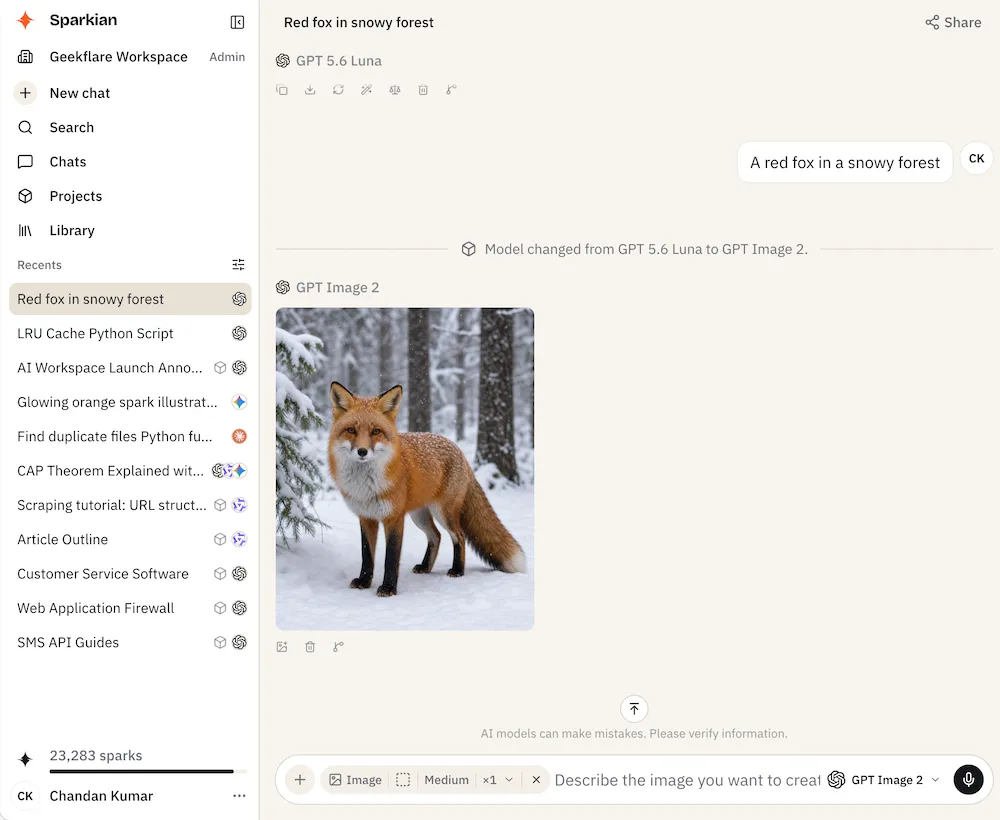
Generating an image
Open the model picker and switch to an image model (grouped under the Image filter), or open the + (Add tools and actions) menu and turn on Create image (or type /image). Sparkian switches the chat into image mode.
Generation settings
Before sending, you can set:
- Image size — Auto, Square, Landscape, or Portrait
- Quality — Low, Medium, or High
- Images — generate up to 4 at once
Sparkian shows an estimated Spark cost for the request before you send, see Sparks (credit system) for how that’s calculated.
Working with a result
Each generated image has its own actions: view fullscreen, download, open in a new tab, use as a reference, delete, and branch from here.
Using an image as a reference
Click Use as a reference to attach a generated image to the composer, then describe the change you want. Sparkian generates a new image based on it. Useful for iterating on a result (changing a color, a pose, a detail) without losing what you already liked about it.